🔗 Maester Integration
Turn TCM’s server-side drift detection into Maester test results — unified M365 security reporting in one place.
What is Maester?
Maester is the community-standard tool for Microsoft 365 security testing. It ships with 400+ built-in checks covering Entra ID, Exchange, Teams, and SharePoint — things like:
- Is MFA enforced for admins?
- Are legacy authentication protocols blocked?
- Is DKIM signing enabled for all domains?
- Are password expiration policies compliant?
Maester runs these checks on demand and produces an HTML report with pass/fail results. Security teams use it for audits, compliance reviews, and continuous validation.
What Maester doesn’t do (yet): detect when someone changes a policy that was previously compliant. Maester checks the current state, but can’t tell you “this CA policy was modified yesterday at 3 PM.”
That’s what TCM does. And EasyTCM bridges the two.
Why Combine TCM + Maester?
They solve different but complementary problems:
| Maester | TCM (via EasyTCM) | |
|---|---|---|
| What it checks | “Is this setting correct?” | “Has this setting changed?” |
| How | Client-side Pester tests against Graph API | Server-side baseline comparison every 6 hours |
| Catches | Misconfigurations (wrong value) | Drift (value changed from known-good) |
| Blind spot | Doesn’t know what the value was before | Doesn’t judge if the value is good |
Together they cover both angles:
- Maester catches settings that are wrong (against security standards)
- TCM catches settings that changed (from your approved baseline)
Real-World Example
Your tenant has a CA policy “Require MFA for Admins” — it’s enabled and Maester’s check passes.
Tuesday 2 PM: Someone adds an exclusion for breakglass@contoso.com to troubleshoot a sign-in issue. They forget to remove it.
- Maester alone: Still passes — the policy exists and is enabled. The exclusion isn’t tested by default.
- TCM alone: Detects the drift —
excludeUserschanged from[]to["breakglass@contoso.com"]. But TCM doesn’t know if this is a security problem. - TCM + Maester (via EasyTCM): The drift appears as a failing Maester test with the exact property change. The security team sees it in their regular Maester report and can investigate.
How It Works
┌─────────────────────────────────────────────────────┐
│          TCM Service (runs every 6 hours)            │
│  Compares tenant config against your baseline        │
│  Detects property-level changes                      │
└──────────────────┬──────────────────────────────────┘
                   │ drift data
                   ▼
┌─────────────────────────────────────────────────────┐
│     Show-TCMDrift -Maester  (or Sync-TCMDrift...)  │
│                                                      │
│  1. Fetches drift from TCM API                       │
│  2. Generates per-monitor test suites:               │
│     • baseline.json  (known-good state)              │
│     • current.json   (baseline + drift applied)      │
│     • TCM-Drift.Tests.ps1  (Pester test file)        │
│  3. Runs Invoke-Maester on the drift folder          │
└──────────────────┬──────────────────────────────────┘
                   │
                   ▼
┌─────────────────────────────────────────────────────┐
│              Maester HTML Report                     │
│                                                      │
│  ✅ 423 security checks passed                       │
│  ❌ 2 TCM drift tests FAILED                         │
│     → conditionalaccesspolicy: excludeUsers changed  │
│     → namedlocation: ipRanges changed                │
│  ✅ 15 TCM drift tests passed (no changes)           │
└─────────────────────────────────────────────────────┘
File Structure Generated
maester-tests/
├── tests/                        ← Maester's built-in 400+ tests
├── Drift/                        ← EasyTCM generates this
│   └── TCM-EasyTCM Recommended/
│       ├── baseline.json         ← Your approved configuration
│       ├── current.json          ← Current state (baseline + drifts)
│       └── TCM-Drift.Tests.ps1   ← Auto-generated Pester tests
└── ...
What Appears in the Maester Report
Each monitored resource becomes a test. Drifted resources fail with property-level detail:
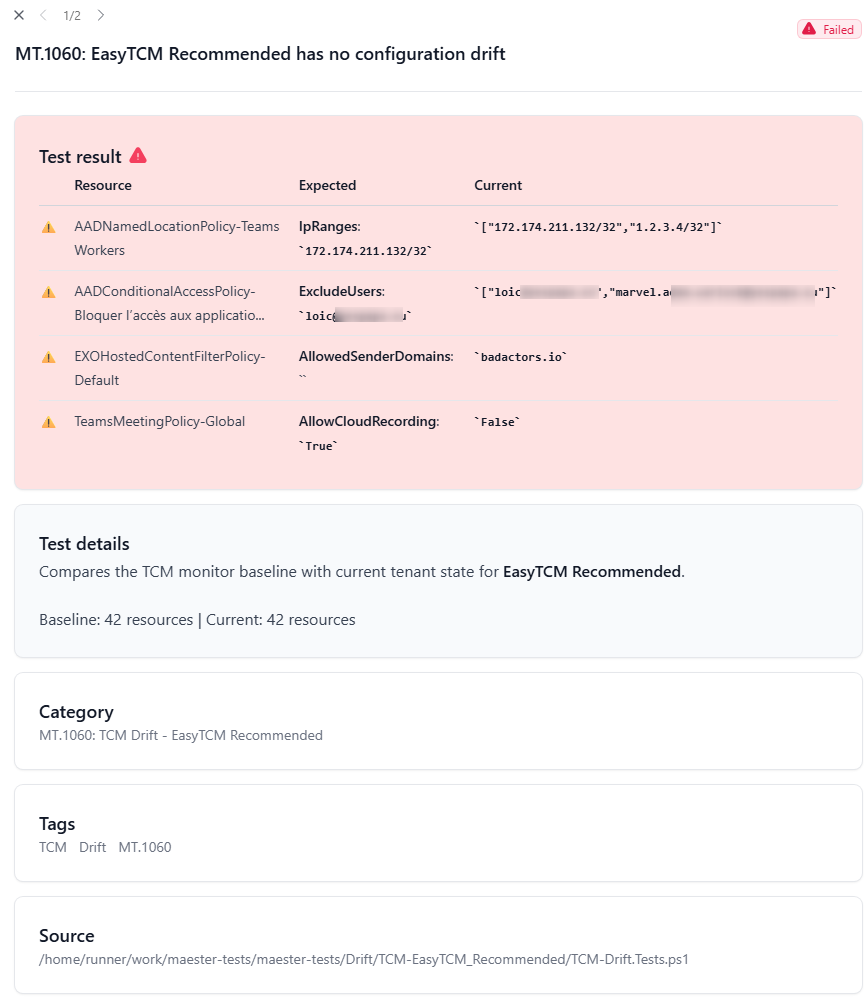
Clean resources show as passing tests — giving you a full inventory of what’s monitored and stable.
Setup
Prerequisites
# Install Maester if you haven't
Install-Module Maester -Scope CurrentUser -Force

# Set up your Maester tests folder
mkdir D:\maester-tests
cd D:\maester-tests
Install-MaesterTests
Tell EasyTCM Where Maester Lives
# Set once — persists across terminal sessions
[Environment]::SetEnvironmentVariable('MAESTER_TESTS_PATH', 'D:\maester-tests', 'User')
$env:MAESTER_TESTS_PATH = 'D:\maester-tests'
Run It
# One command: sync TCM drift → generate tests → run Maester
Show-TCMDrift -Maester
That’s it. The Maester HTML report opens with your drift results alongside all standard security tests.
Step-by-Step (If You Prefer Control)
# Step 1: Sync drift data to Maester format
Sync-TCMDriftToMaester

# Step 2: Run ONLY drift tests
Invoke-Maester -Path "$env:MAESTER_TESTS_PATH\Drift"

# OR run the full Maester suite (drift + 400+ security checks)
cd $env:MAESTER_TESTS_PATH
Connect-Maester
Invoke-Maester
Catching New and Deleted Resources
TCM drift detection only catches property changes on resources in the baseline. It won’t detect:
- A new CA policy someone created
- A transport rule that was deleted
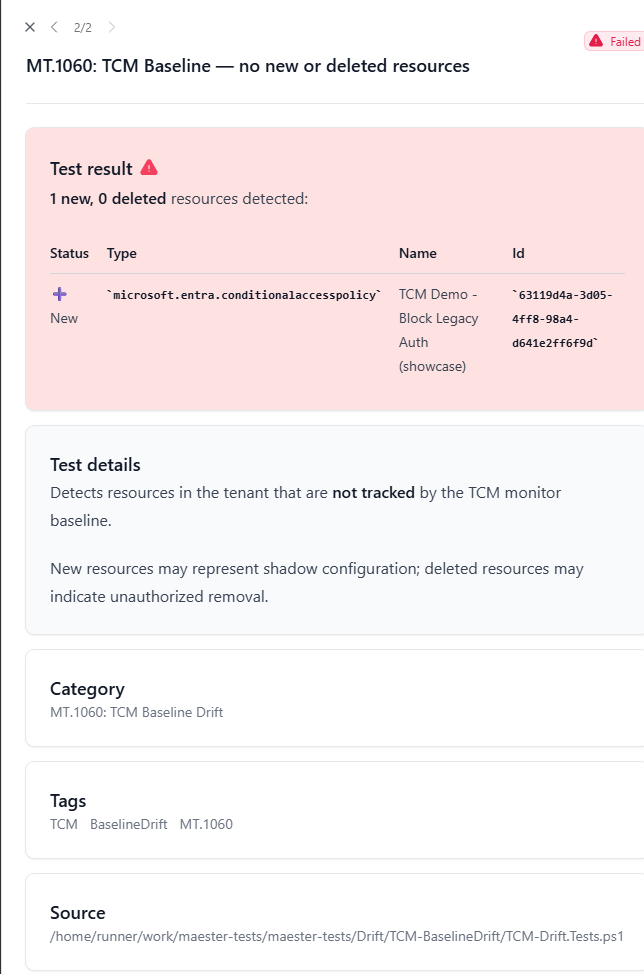
Add -CompareBaseline to catch these:
Show-TCMDrift -Maester -CompareBaseline
This takes a fresh snapshot (cached for 1 hour to save quota) and includes new/deleted resources in the Maester report as additional test results.
Key Design Decisions
Why generate .Tests.ps1 files?
Maester discovers tests by scanning for *.Tests.ps1 files. By generating standard Pester tests, EasyTCM integrates without any Maester code changes. It just works.
Why Add-MtTestResultDetail?
This is Maester’s own helper for enriching test output in the HTML report. Using it means drift results get the same formatting as Maester’s built-in tests — consistent UX.
Why baseline.json + current.json?
This is the pattern the Maester community established for drift data. EasyTCM follows it for future compatibility if Maester adds native drift support.
Why does TCM store baselines server-side? The Maester community spent months debating where to store drift baselines (local files? git? blob storage?). TCM eliminates this entirely — Microsoft stores your baseline in the TCM service. No state management needed on your end.