🛡️ EasyTCM
The missing PowerShell layer between Microsoft’s TCM APIs and the 200,000+ M365 admins who need continuous configuration monitoring.
From the creator of EasyPIM — the same philosophy applied to Microsoft’s brand-new Tenant Configuration Management APIs.


The Problem: Every M365 Tenant Drifts
Someone changes a Conditional Access policy. A transport rule gets modified. A Teams federation setting shifts. An authentication method is disabled.
You don’t know until something breaks — or fails an audit.
Configuration drift is one of the most common causes of security incidents in Microsoft 365:
- 🔓 A Conditional Access exclusion added “temporarily” — and forgotten for 6 months
- 📧 An anti-phishing rule disabled during troubleshooting — never re-enabled
- 🔑 Authentication methods changed — weakening MFA without anyone noticing
- 🌐 Named locations modified — opening network access from unintended regions
Without continuous monitoring, you’re flying blind.
The Solution: Tenant Configuration Management (TCM)
Microsoft shipped the TCM APIs (public preview) to solve this. TCM provides:
- Server-side monitoring — checks your config every 6 hours, automatically
- 6 workloads — Entra, Exchange, Intune, Teams, Defender, Purview (62 resource types)
- Property-level drift detection — tells you exactly what changed, from what, to what
- Baseline comparison — compare current state against your known-good configuration
But the raw API is complex. Dual-layer authentication. Hand-crafted JSON baselines. Zero reporting. Strict quotas that are easy to blow.
EasyTCM makes it accessible.
How EasyTCM Works
One Command to Start
Install-Module EasyTCM
Start-TCMMonitoring
That’s it. Start-TCMMonitoring is a guided wizard that handles everything:
- ✅ Connects to Microsoft Graph
- ✅ Creates the TCM service principal and grants permissions
- ✅ Takes a snapshot of your current tenant configuration
- ✅ Converts it to a security-focused baseline
- ✅ Creates a monitor that checks every 6 hours
One Command to Check
Show-TCMDrift
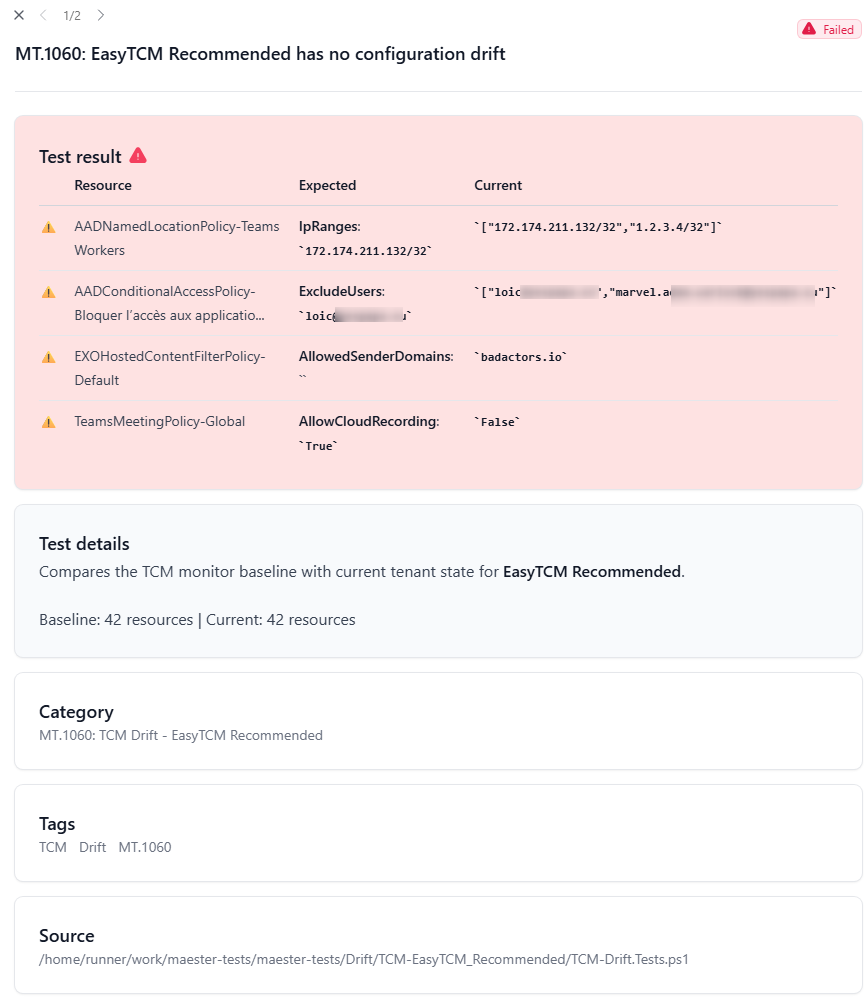
🔍 Checking for configuration drift...

  ⚠️  3 active drift(s) detected!

  conditionalaccesspolicy (2):
    • Block Legacy Auth — 1 changed property
      state: enabled → disabled
    • Require MFA for Admins — 2 changed properties
      excludeUsers: [] → ["user@contoso.com"]
      sessionControls: {...} → {...}

  namedlocation (1):
    • Corporate Network — 1 changed property
      ipRanges: ["10.0.0.0/8"] → ["10.0.0.0/8","192.168.0.0/16"]
One Command to Rebaseline
After approved changes, accept the new state:
Update-TCMBaseline
✏️ Adjust What You Monitor
Need to expand or narrow your monitoring coverage? The interactive editor makes it visual:
Edit-TCMMonitor       # opens HTML editor in browser
Show-TCMMonitor -Browser  # read-only inspection
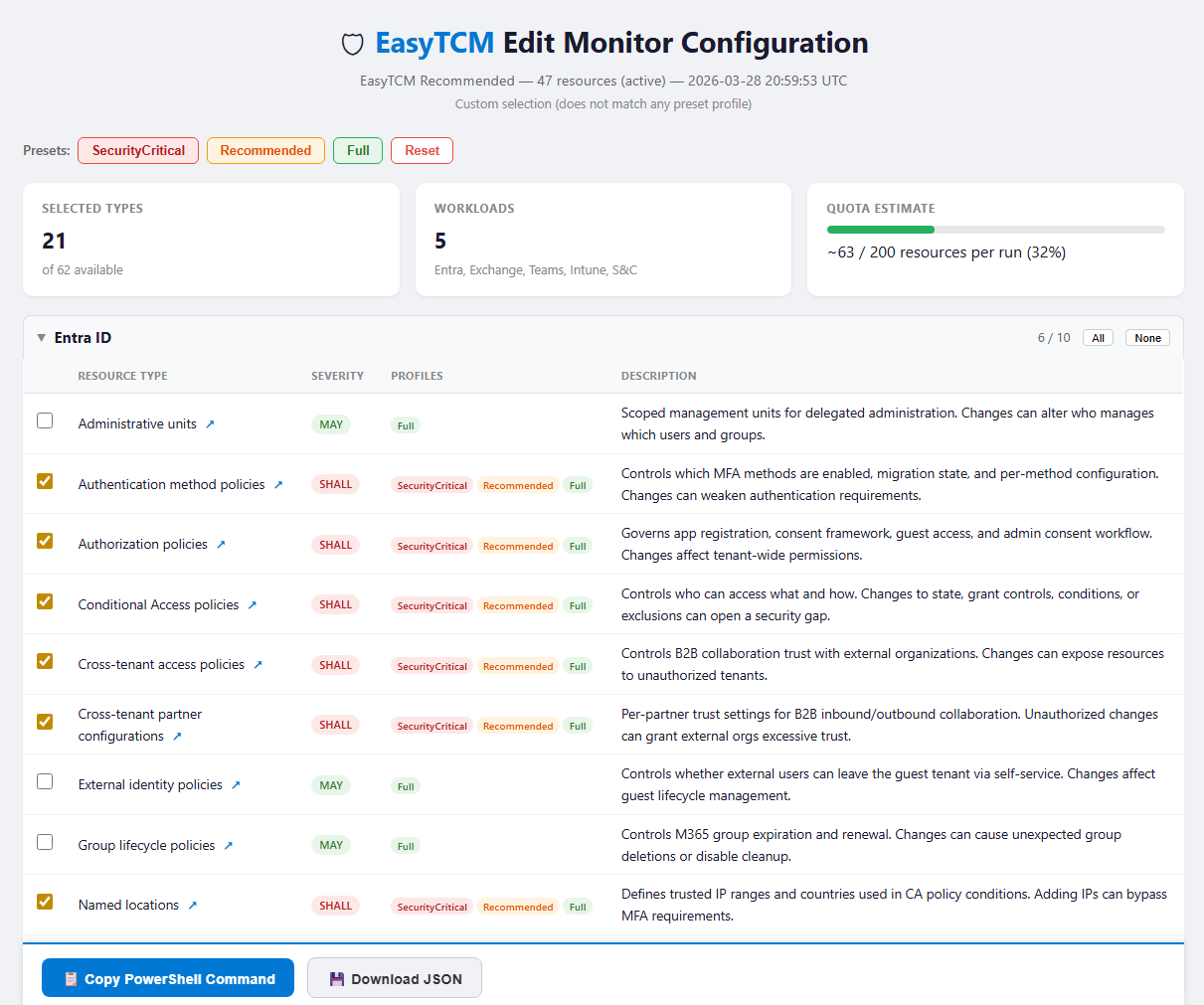
Select types with checkboxes, click Copy PowerShell Command, paste into your terminal. EasyTCM snapshots only the new types, merges into your existing baseline, and updates the monitor — existing drift detection stays intact.
# Or expand with a compliance template — no full rebaseline
Add-TCMMonitorType -Template CISA-SCuBA-Exchange
The Architecture
┌─────────────────────────────────────────────────┐
│                Microsoft 365 Tenant              │
│  Entra · Exchange · Intune · Teams · Compliance  │
└──────────────────┬──────────────────────────────┘
                   │
        TCM checks every 6 hours
                   │
┌──────────────────▼──────────────────────────────┐
│          TCM Service (Server-Side)               │
│  • Stores baselines                              │
│  • Runs monitoring cycles                        │
│  • Detects property-level drift                  │
│  • Tracks drift until resolved                   │
└──────────────────┬──────────────────────────────┘
                   │
            EasyTCM cmdlets
                   │
┌──────────────────▼──────────────────────────────┐
│              Your Workflow                        │
│                                                  │
│  Show-TCMDrift           → Console summary      │
│  Show-TCMDrift -Report   → HTML dashboard       │
│  Show-TCMDrift -Maester  → Maester test suite   │
│  Update-TCMBaseline       → Accept new state     │
│  Edit-TCMMonitor          → Adjust what you watch │
└─────────────────────────────────────────────────┘
Why Monitoring Profiles Matter
TCM has a strict quota: 800 monitored resources per day across all monitors. Each monitor runs 4 times/day (every 6 hours), so you can realistically monitor ~200 resource instances.
A typical tenant has 300-500 resources. Monitoring everything will blow your quota.
EasyTCM solves this with monitoring profiles in ConvertTo-TCMBaseline:
| Profile | Resource Types | Typical Daily Cost | Coverage |
|---|---|---|---|
| SecurityCritical (default) | ~16 | 80-120 / 800 | CA policies, auth methods, mail security, federation |
| Recommended | ~30 | 200-400 / 800 | Above + roles, compliance, device policies |
| Full | ~52 | ⚠️ 400-2000+ / 800 | Everything — will likely exceed quota |
SecurityCritical covers 80% of the attack surface in ~15% of the quota. That’s the sweet spot.
# Default — quota-safe, covers what matters
Start-TCMMonitoring

# Broader coverage
Start-TCMMonitoring -Profile Recommended
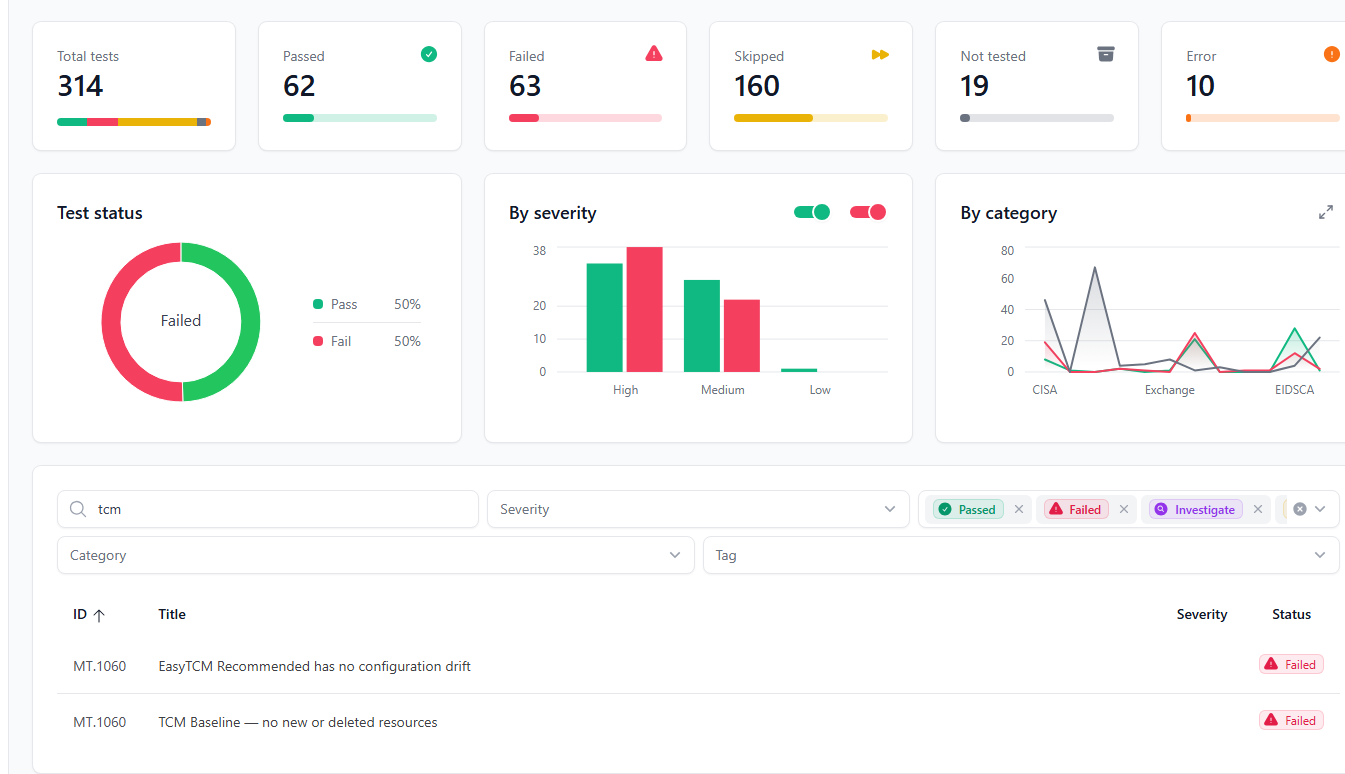
Maester Integration →
Turn TCM’s server-side monitoring into Maester test results — the bridge both communities have been waiting for.
Continuous Monitoring Guide →
The complete lifecycle: setup, daily checks, rebaselining, and automation.
GitHub Actions →
Ready-to-use workflows: vanilla Maester (Phase 1) and Maester + TCM drift detection (Phase 2) — add one file, get continuous monitoring.
Cmdlet Reference →
All 24 cmdlets with examples and parameter documentation.
Get Started Now
Install-Module EasyTCM -Scope CurrentUser
Start-TCMMonitoring
⭐ Star the repo on GitHub — feedback and contributions welcome!