🚀 GitHub Actions: Maester + TCM Continuous Monitoring
Automated daily M365 security checks and drift detection — unified HTML report, zero servers.
For other automation options (Windows Task Scheduler, Azure Automation), see the Continuous Monitoring Guide.
Step 1: Create the Entra App
The New-MaesterServicePrincipal.ps1 script automates the entire Entra setup — from 17 manual portal steps to one command.
Prerequisites: Microsoft.Graph.Authentication module + GitHub CLI (gh auth login) + Global Admin (or Application Admin + Security Admin).
# Clone the repo
git clone https://github.com/kayasax/EasyTCM.git
cd EasyTCM

# Run the setup — auto-detects your GitHub repo from git remote
.\scripts\New-MaesterServicePrincipal.ps1 -IncludeExchange -IncludeTeams
TCM permissions are included by default. Add
-IncludeTCM:$falseif you only want vanilla Maester.
The script will:
- Create an Entra app registration (“Maester DevOps Account”)
- Grant all Maester Graph permissions +
ConfigurationMonitoring.ReadWrite.Allfor TCM - Add a federated identity credential (OIDC — no secrets to rotate)
- Set
AZURE_CLIENT_IDandAZURE_TENANT_IDas GitHub secrets viagh
Prefer manual setup? Follow the official Maester guide for the app registration, then add
ConfigurationMonitoring.ReadWrite.Allfor TCM and setAZURE_CLIENT_ID+AZURE_TENANT_IDas GitHub secrets.
Step 2: Initialize TCM (One-Time)
The TCM service principal needs to be provisioned once before the workflow can read drift data. Run this from any machine with Global Admin:
Install-Module EasyTCM -Scope CurrentUser
Connect-MgGraph -Scopes 'Application.ReadWrite.All','ConfigurationMonitoring.ReadWrite.All'
Start-TCMMonitoring
Start-TCMMonitoring is a guided wizard — it creates the TCM service principal, takes a snapshot of your tenant, and sets up a monitor that checks every 6 hours. Takes about 5 minutes.
Step 3: Add the Workflow File
Copy maester-tcm.yml to your repository:
# From inside your maester-tests repo
mkdir -p .github/workflows
Copy-Item <path-to-EasyTCM>/templates/workflows/maester-tcm.yml .github/workflows/
git add .github/workflows/maester-tcm.yml
git commit -m "Add Maester + TCM workflow"
git push
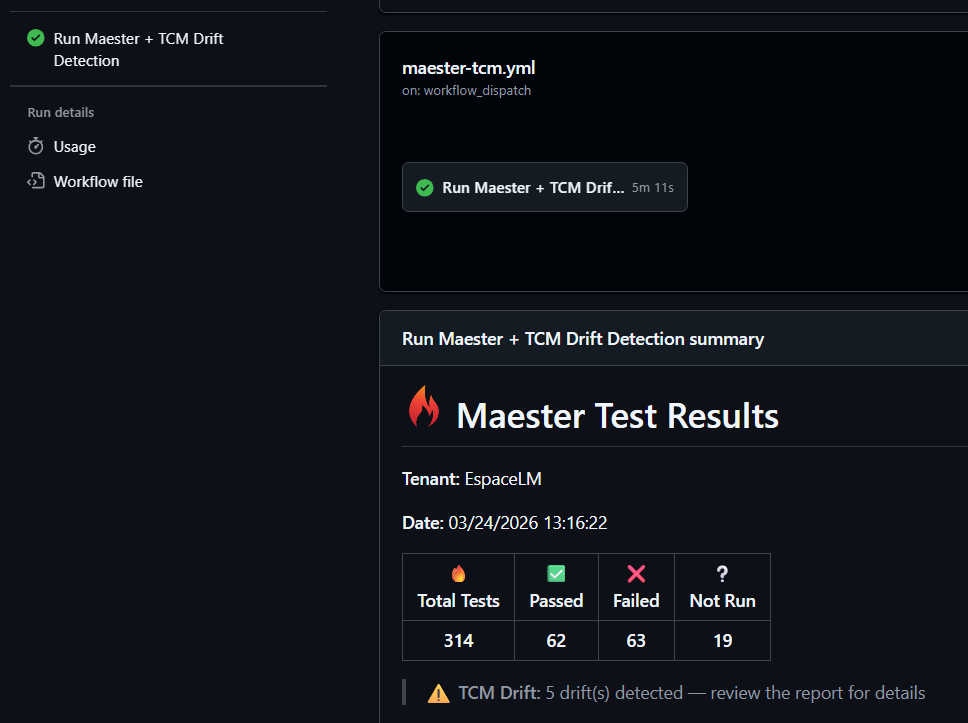
That’s it. The workflow runs daily at 06:00 UTC and on manual trigger.
What You Get
Every run does this automatically:
- Authenticates via OIDC (zero secrets to rotate)
- Installs Maester + EasyTCM
- Runs 400+ Maester security tests (CIS, CISA SCuBA, EIDSCA)
- Syncs TCM drift data into Maester test format
- Runs all tests together → unified HTML report
- Uploads report as artifact + rich job summary
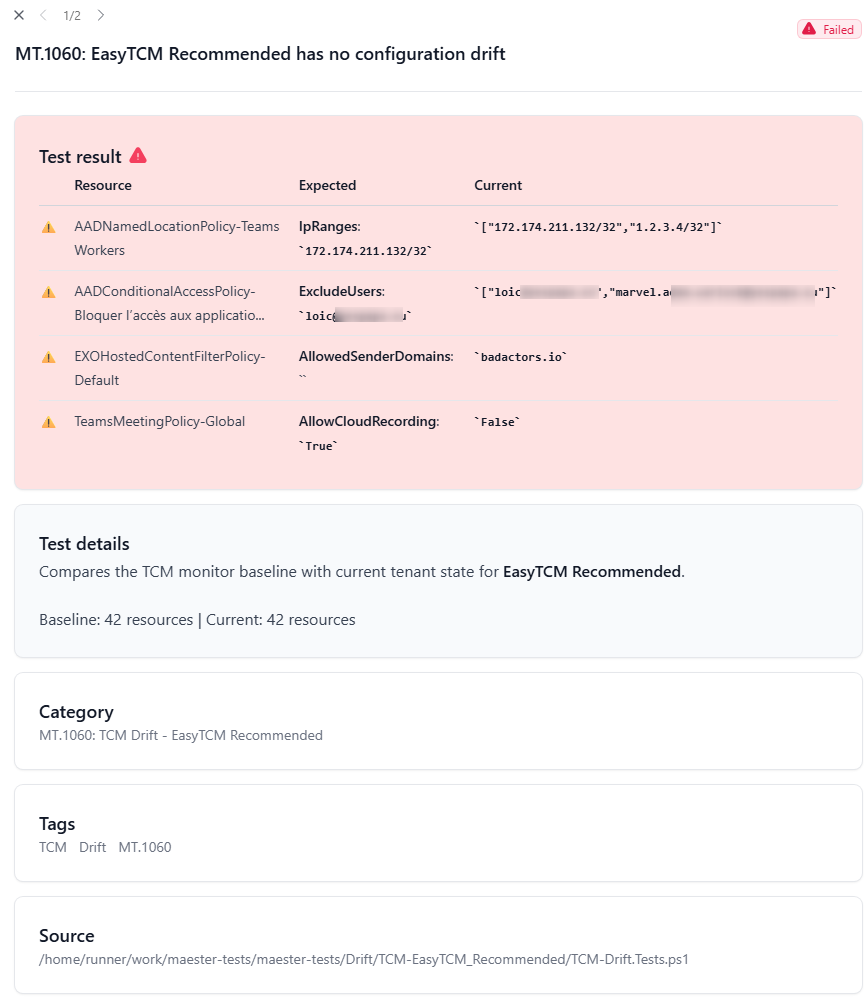
The HTML report shows property-level drift detail — exactly which property, the expected value, and the current value:
Customization
Change the schedule
# Every 6 hours (matches TCM's monitoring cycle)
- cron: '0 */6 * * *'

# Weekdays only at 07:30 UTC
- cron: '30 7 * * 1-5'
Change the monitoring profile
# Security-critical resources only (lower quota impact)
Start-TCMMonitoring -Profile SecurityCritical

# Broader coverage (default)
Start-TCMMonitoring -Profile Recommended
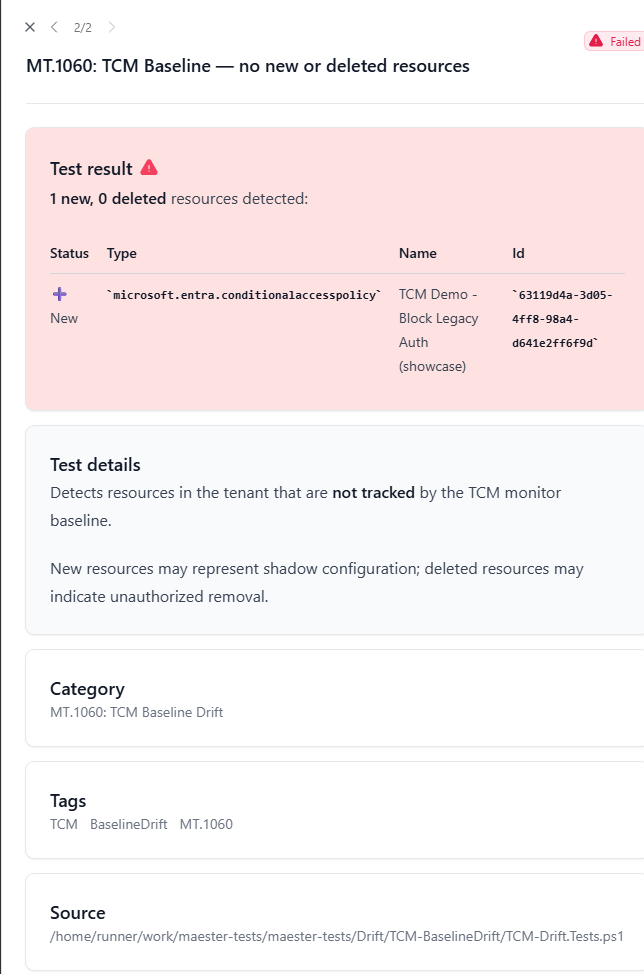
Baseline comparison (detect new/deleted resources)
TCM drift only catches property changes on resources in the baseline. To also catch new CA policies or deleted transport rules, the workflow runs -CompareBaseline automatically on Mondays.
You can also trigger it manually:
gh workflow run maester-tcm.yml -f compare_baseline=true
⚠️
-CompareBaselinetakes a fresh snapshot (counts against your daily quota). Use it no more than once per day.
Teams notifications
Add a step that posts to a webhook on failure:
- name: Notify Teams on drift
  if: failure()
  shell: pwsh
  env:
    TEAMS_WEBHOOK_URI: $
  run: |
    $body = @{
      text = "⚠️ EasyTCM detected M365 tenant drift. See the workflow run for details."
    } | ConvertTo-Json
    Invoke-RestMethod -Uri $env:TEAMS_WEBHOOK_URI -Method Post `
        -Body $body -ContentType 'application/json'
Troubleshooting
| Problem | Fix |
|---|---|
Test-TCMConnection fails with “insufficient privileges” |
App is missing ConfigurationMonitoring.ReadWrite.All. Grant it and re-consent. |
| “No monitors found” or empty drift | Run Initialize-TCM or Start-TCMMonitoring interactively once. |
| OIDC authentication fails | Federated credential must match exact org/repo/branch. Check id-token: write in workflow permissions. |
| Maester reports 0 tests | Install-MaesterTests failed. Check Gallery connectivity. Set HTTP_PROXY on corp runners. |
| Quota exceeded | Run Get-TCMQuota. Switch to SecurityCritical profile or reduce schedule frequency. |